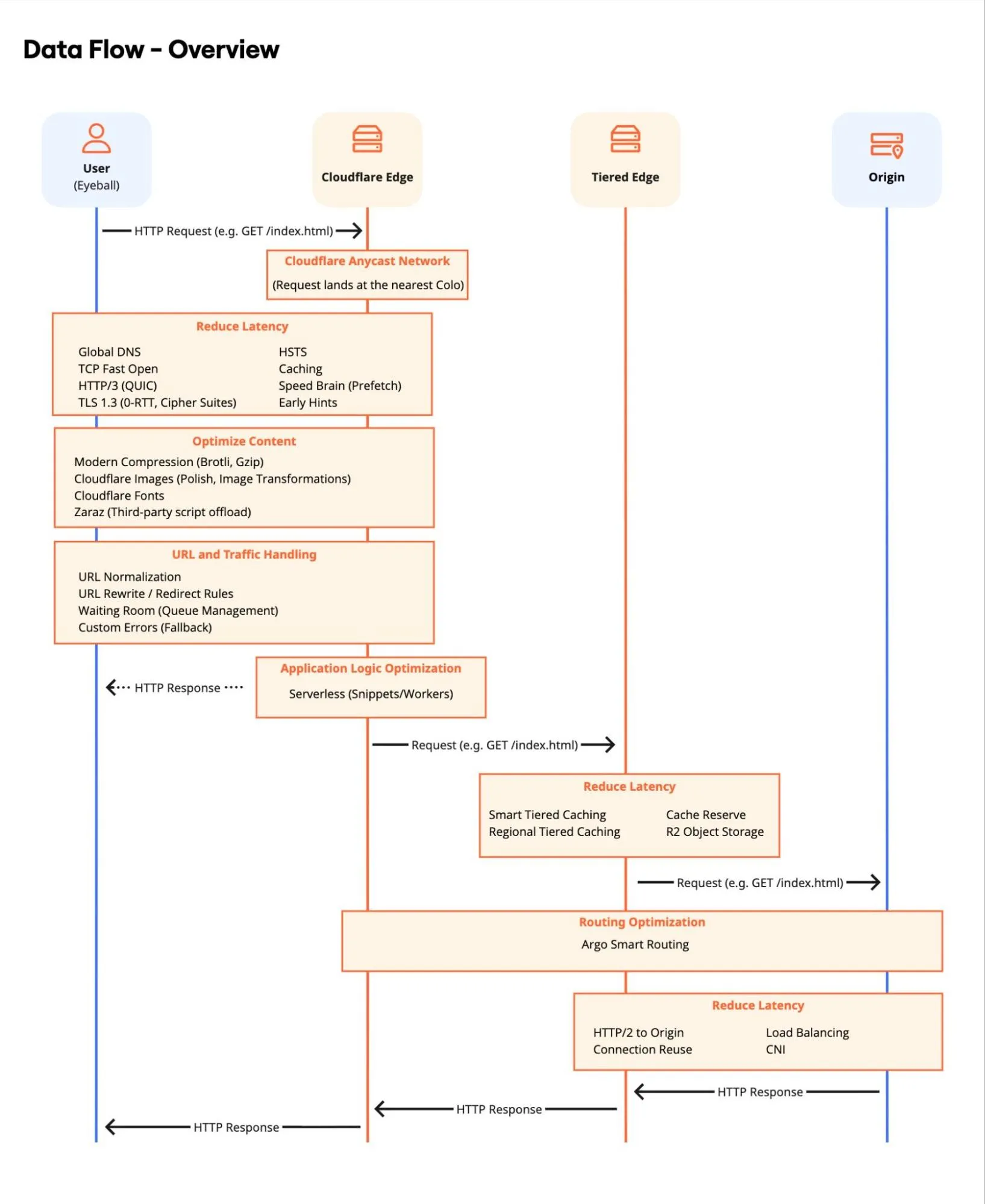
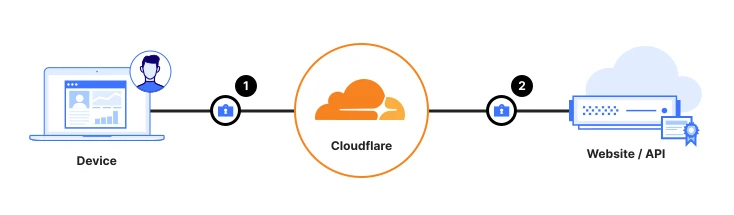
Cloudflare Tunnel là gì? Đưa app nội bộ ra ngoài mà không mở port inbound What is Cloudflare Tunnel? Publishing an internal app without opening inbound ports What is Cloudflare Tunnel? Publishing an internal app without opening inbound ports
Tunnel giống tổng đài gọi ra: máy của bạn chủ động nối tới Cloudflare, nên firewall không cần mở cửa cho cả Internet gõ vào IP origin. A tunnel is like a phone that dials out: your machine connects to Cloudflare, so the firewall does not have to open a door for the whole Internet to knock on the origin IP. A tunnel is like a phone that dials out: your machine connects to Cloudflare, so the firewall does not have to open a door for the whole Internet to knock on the origin IP.
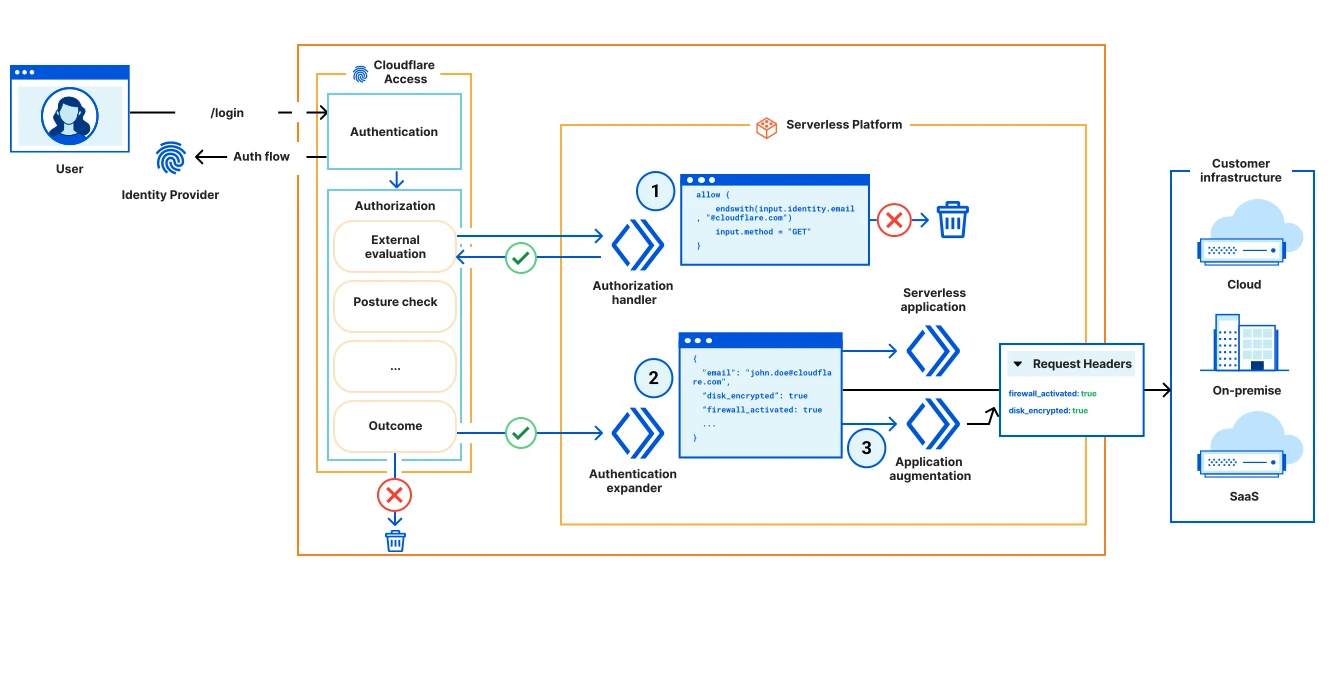
Mở rộng ZTNA bằng ủy quyền ngoài và serverless Extend ZTNA with external authorization and serverless computing Extend ZTNA with external authorization and serverless computing
ZTNA tăng cường policy Access bằng gọi API ngoài và Workers — xác thực và ủy quyền user trước khi vào tài nguyên được bảo vệ. Cloudflare's ZTNA enhances access policies using external API calls and Workers for robust security. It verifies user authentication and authorization, ensuring only legitimate access to protected resources. Cloudflare's ZTNA enhances access policies using external API calls and Workers for robust security. It verifies user authentication and authorization, ensuring only legitimate access to protected resources.
Thuật ngữ: Concepts: Concepts: Access · External Evaluation · Workers · ZTNA
Sơ đồ chính thức ↗ Official diagram ↗ Official diagram ↗ · SASE / Cloudflare One Secure Access Service Edge (SASE) Secure Access Service Edge (SASE)
Vì sao mở port 443 trên firewall là cách cũ dễ đau? Why opening port 443 on the firewall is the old way that hurts Why opening port 443 on the firewall is the old way that hurts
App nội bộ — Grafana, wiki, tool dev, API chỉ dành cho nhân viên — thường nằm sau firewall. Cách cũ là NAT một port ra Internet và trỏ DNS A record tới IP đó. IP origin lộ, scanner gõ thẳng, và nếu ai đó tắt proxy Cloudflare thì WAF không còn đứng trước app. VPN site-to-site thì nặng: cả mạng được tin, không chỉ đúng ứng dụng. An internal app — Grafana, a wiki, a dev tool, an employee-only API — usually sits behind a firewall. The old fix is to NAT a port to the Internet and point a DNS A record at that IP. The origin IP is exposed, scanners knock directly, and if someone turns the Cloudflare proxy off, the WAF is no longer in front. A site-to-site VPN is heavy: the whole network is trusted, not just the one application. An internal app — Grafana, a wiki, a dev tool, an employee-only API — usually sits behind a firewall. The old fix is to NAT a port to the Internet and point a DNS A record at that IP. The origin IP is exposed, scanners knock directly, and if someone turns the Cloudflare proxy off, the WAF is no longer in front. A site-to-site VPN is heavy: the whole network is trusted, not just the one application.
Cloudflare Tunnel (trước đây gọi là Argo Tunnel) đảo chiều kết nối. Bạn cài daemon `cloudflared` trên máy hoặc trong mạng của mình. Process đó chủ động mở kết nối đi ra tới Cloudflare — firewall hầu như đã cho phép outbound. Sau khi đường hầm đứng, traffic đi hai chiều trên kết nối đó. Tài liệu hiện tại nói mỗi tunnel giữ bốn kết nối dài tới hai data center để có dự phòng; bạn có thể chạy thêm replica `cloudflared` nếu cần sẵn sàng cao hơn. Cloudflare Tunnel (formerly Argo Tunnel) reverses the connection. You install the `cloudflared` daemon on your machine or inside your network. That process dials out to Cloudflare — firewalls usually already allow outbound. Once the tunnel is up, traffic flows both ways on that connection. Current docs say each tunnel keeps four long-lived connections to two data centers for redundancy; you can run extra `cloudflared` replicas when you need more availability. Cloudflare Tunnel (formerly Argo Tunnel) reverses the connection. You install the `cloudflared` daemon on your machine or inside your network. That process dials out to Cloudflare — firewalls usually already allow outbound. Once the tunnel is up, traffic flows both ways on that connection. Current docs say each tunnel keeps four long-lived connections to two data centers for redundancy; you can run extra `cloudflared` replicas when you need more availability.
Kết nối đi qua cổng `7844` (TCP hoặc UDP, HTTP/2 hoặc QUIC). Không có listener inbound trên origin, nên Authenticated Origin Pulls không áp dụng cho hostname đi qua Tunnel: origin đã được xác thực bằng credential của connector. Bài trên blog.cloudflare.com về Zero Trust thường vẽ Tunnel là “đường vào” và Access là “người gác cửa”. The connection uses port `7844` (TCP or UDP, HTTP/2 or QUIC). There is no inbound listener on the origin, so Authenticated Origin Pulls do not apply to hostnames routed through Tunnel: the origin is already authenticated with the connector’s credentials. Cloudflare Blog posts on Zero Trust usually draw Tunnel as the path in and Access as the door attendant. The connection uses port `7844` (TCP or UDP, HTTP/2 or QUIC). There is no inbound listener on the origin, so Authenticated Origin Pulls do not apply to hostnames routed through Tunnel: the origin is already authenticated with the connector’s credentials. Cloudflare Blog posts on Zero Trust usually draw Tunnel as the path in and Access as the door attendant.
Mở rộng ZTNA bằng ủy quyền ngoài và serverless Extend ZTNA with external authorization and serverless computing Extend ZTNA with external authorization and serverless computing
ZTNA tăng cường policy Access bằng gọi API ngoài và Workers — xác thực và ủy quyền user trước khi vào tài nguyên được bảo vệ. Cloudflare's ZTNA enhances access policies using external API calls and Workers for robust security. It verifies user authentication and authorization, ensuring only legitimate access to protected resources. Cloudflare's ZTNA enhances access policies using external API calls and Workers for robust security. It verifies user authentication and authorization, ensuring only legitimate access to protected resources.
Thuật ngữ: Concepts: Concepts: Access · External Evaluation · Workers · ZTNA
Sơ đồ chính thức ↗ Official diagram ↗ Official diagram ↗ · SASE / Cloudflare One Secure Access Service Edge (SASE) Secure Access Service Edge (SASE)
Published application: hostname công khai, service thì ở localhost Published applications: a public hostname, a service on localhost Published applications: a public hostname, a service on localhost
Cách bắt đầu trên dashboard: Networking → Tunnels → Create, chọn OS, chạy lệnh cài và token trên server. Khi trạng thái Healthy, thêm route kiểu Published application: hostname `grafana.example.com` trỏ tới Service URL `http://localhost:3000` (hoặc `http://192.0.2.1:3000` nếu app nằm máy khác). Cloudflare tạo bản ghi để tên đó đi vào tunnel, thường là CNAME tới `<UUID>.cfargotunnel.com`. The dashboard start: Networking → Tunnels → Create, pick the OS, run the install and token on the server. When status is Healthy, add a Published application route: hostname `grafana.example.com` to Service URL `http://localhost:3000` (or `http://192.0.2.1:3000` if the app is on another machine). Cloudflare creates the record so that name enters the tunnel, typically a CNAME to `<UUID>.cfargotunnel.com`. The dashboard start: Networking → Tunnels → Create, pick the OS, run the install and token on the server. When status is Healthy, add a Published application route: hostname `grafana.example.com` to Service URL `http://localhost:3000` (or `http://192.0.2.1:3000` if the app is on another machine). Cloudflare creates the record so that name enters the tunnel, typically a CNAME to `<UUID>.cfargotunnel.com`.
Tunnel quản lý từ xa (remotely managed) giữ cấu hình ingress trên Cloudflare — hợp khi nhiều người sửa route trên dashboard. Tunnel quản lý local giữ `config.yml` trên máy chạy `cloudflared`, hợp khi bạn muốn file cấu hình nằm trong repo vận hành. Cùng một tunnel có thể publish nhiều app. Tài liệu routing nói một tunnel remotely managed chịu khoảng 5.000–10.000 published application, vì cấu hình ingress tối đa khoảng 1 MB; mỗi account gồm 1.000 tunnel. A remotely managed tunnel stores ingress config on Cloudflare — a fit when several people edit routes in the dashboard. A locally managed tunnel keeps `config.yml` on the machine running `cloudflared`, a fit when that file should live in an ops repo. One tunnel can publish many apps. Routing docs put a remotely managed tunnel at roughly 5,000–10,000 published applications, because the ingress config tops out around 1 MB; each account includes 1,000 tunnels. A remotely managed tunnel stores ingress config on Cloudflare — a fit when several people edit routes in the dashboard. A locally managed tunnel keeps `config.yml` on the machine running `cloudflared`, a fit when that file should live in an ops repo. One tunnel can publish many apps. Routing docs put a remotely managed tunnel at roughly 5,000–10,000 published applications, because the ingress config tops out around 1 MB; each account includes 1,000 tunnels.
Ngoài HTTP, Tunnel còn đưa TCP, SSH, RDP và một số giao thức khác qua Cloudflare, tùy cách bạn gắn route. Điều cần nhớ: Tunnel là off-ramp. Nó không dành cho giao thức do server chủ động gọi ra như VoIP hay SIP. Với HTTP, origin thấy IP của `cloudflared` chứ không thấy IP khách — hãy đọc header `CF-Connecting-IP`. Với SSH hay RDP, IP nguồn gốc không có sẵn tại origin. Beyond HTTP, Tunnel can carry TCP, SSH, RDP, and other protocols depending on how you attach the route. Remember: Tunnel is off-ramp only. It is not for server-initiated protocols such as VoIP or SIP. For HTTP, the origin sees the `cloudflared` IP rather than the visitor IP — read the `CF-Connecting-IP` header. For SSH or RDP, the original source IP is not available at the origin. Beyond HTTP, Tunnel can carry TCP, SSH, RDP, and other protocols depending on how you attach the route. Remember: Tunnel is off-ramp only. It is not for server-initiated protocols such as VoIP or SIP. For HTTP, the origin sees the `cloudflared` IP rather than the visitor IP — read the `CF-Connecting-IP` header. For SSH or RDP, the original source IP is not available at the origin.
Publish ra Internet chưa phải Zero Trust — hãy khóa bằng Access Publishing to the Internet is not Zero Trust yet — lock it with Access Publishing to the Internet is not Zero Trust yet — lock it with Access
Một published application mặc định là ai có URL cũng mở được, chỉ khác là traffic đi qua mạng Cloudflare và origin không lộ IP. Đó là bước giấu origin, chưa phải bước chọn người. Cloudflare Access đứng trước app: khách đăng nhập SSO, đúng nhóm mới vào. Bài Access trên hub này nói chính sách danh tính; bài này nói đường ống. Dùng một mình Tunnel cho Grafana công ty là cửa kính không khóa. A published application is reachable by anyone with the URL by default. Traffic goes through Cloudflare and the origin IP stays hidden, but you have not chosen who may enter. Cloudflare Access sits in front: the visitor signs in with SSO, and only the right group gets through. The Access post on this hub covers identity policy; this post covers the pipe. Tunnel alone in front of a company Grafana is an unlocked glass door. A published application is reachable by anyone with the URL by default. Traffic goes through Cloudflare and the origin IP stays hidden, but you have not chosen who may enter. Cloudflare Access sits in front: the visitor signs in with SSO, and only the right group gets through. The Access post on this hub covers identity policy; this post covers the pipe. Tunnel alone in front of a company Grafana is an unlocked glass door.
Muốn nguyên một dải mạng private (không phải từng hostname) thì thêm CIDR route trên tunnel, rồi người dùng đi qua Cloudflare One Client (WARP) thay vì mở app ra Internet. Đó là bài toán “thay VPN vào cả subnet”, khác bài toán “một URL cho một app”. Đừng trộn hai mô hình trong cùng một buổi thí điểm nếu team còn mới. If you want a whole private range rather than one hostname, add a CIDR route on the tunnel, and users come in through the Cloudflare One Client (WARP) instead of exposing the app to the Internet. That is “replace the VPN into a subnet”, which is different from “one URL for one app”. Do not mix the two models in the same pilot if the team is still new. If you want a whole private range rather than one hostname, add a CIDR route on the tunnel, and users come in through the Cloudflare One Client (WARP) instead of exposing the app to the Internet. That is “replace the VPN into a subnet”, which is different from “one URL for one app”. Do not mix the two models in the same pilot if the team is still new.
Origin phía sau tunnel vẫn nên khỏe: HTTPS giữa `cloudflared` và app khi app lắng nghe TLS, đúng Origin Server Name nếu chứng chỉ không khớp `localhost`, và không tắt kiểm tra chứng chỉ cho tiện. Load Balancing có thể dùng tunnel làm origin trong pool khi bạn có nhiều connector. Workers cũng có thể tới dịch vụ private qua tunnel (Workers VPC) — đó là bước sau, khi đường hầm đã Healthy. The origin behind the tunnel should still be tidy: HTTPS between `cloudflared` and the app when the app speaks TLS, the right Origin Server Name if the certificate is not for `localhost`, and do not disable certificate checks for convenience. Load Balancing can use a tunnel as an origin in a pool when you have several connectors. Workers can also reach private services through a tunnel (Workers VPC) — a later step, once the tunnel is Healthy. The origin behind the tunnel should still be tidy: HTTPS between `cloudflared` and the app when the app speaks TLS, the right Origin Server Name if the certificate is not for `localhost`, and do not disable certificate checks for convenience. Load Balancing can use a tunnel as an origin in a pool when you have several connectors. Workers can also reach private services through a tunnel (Workers VPC) — a later step, once the tunnel is Healthy.
Checklist buổi đầu: một app, một hostname, một chính sách First-session checklist: one app, one hostname, one policy First-session checklist: one app, one hostname, one policy
Một: chọn app web nội bộ không quan trọng để thí điểm, cùng máy với `cloudflared` lúc đầu cho đỡ rối mạng. Hai: tạo remotely managed tunnel trên dashboard, chạy connector, đợi Healthy. Ba: publish một subdomain đã có trên zone Cloudflare, Service URL đúng port. Bốn: thêm Access application để chỉ email hoặc nhóm thử được vào. Năm: kiểm tra từ điện thoại ngoài văn phòng, không chỉ từ trong LAN. One: pick a low-stakes internal web app, on the same machine as `cloudflared` at first so the network stays simple. Two: create a remotely managed tunnel in the dashboard, run the connector, wait until Healthy. Three: publish a subdomain that already exists on your Cloudflare zone, with the correct Service URL port. Four: add an Access application so only a test email or group can enter. Five: test from a phone outside the office, not only from inside the LAN. One: pick a low-stakes internal web app, on the same machine as `cloudflared` at first so the network stays simple. Two: create a remotely managed tunnel in the dashboard, run the connector, wait until Healthy. Three: publish a subdomain that already exists on your Cloudflare zone, with the correct Service URL port. Four: add an Access application so only a test email or group can enter. Five: test from a phone outside the office, not only from inside the LAN.
Sáu: firewall chỉ cần cho `cloudflared` đi ra cổng 7844; đừng mở inbound “cho chắc”. Bảy: log connector và biết replica nào đang nối. Tám: đừng commit token tunnel vào git — token đó là credential của connector. Nếu server nằm sau firewall gắt, chạy connectivity pre-check trong docs trước khi đổ lỗi cho cấu hình ingress. Six: the firewall only needs to let `cloudflared` out on port 7844; do not open inbound “just in case”. Seven: watch connector logs and know which replica is connected. Eight: do not commit the tunnel token to git — that token is the connector’s credential. If the server sits behind a strict firewall, run the connectivity pre-check in the docs before blaming the ingress config. Six: the firewall only needs to let `cloudflared` out on port 7844; do not open inbound “just in case”. Seven: watch connector logs and know which replica is connected. Eight: do not commit the tunnel token to git — that token is the connector’s credential. If the server sits behind a strict firewall, run the connectivity pre-check in the docs before blaming the ingress config.
Câu hỏi tự kiểm tra: “Nếu tôi gỡ Access, người lạ có mở được URL không?” Nếu có, bạn đang publish công khai — cố ý hoặc chưa. Đọc trang Tunnel và Access trên hub, use case thay VPN, và docs routing khi bạn cần SSH hoặc nhiều hostname trên cùng một connector. Self-check: “If I remove Access, can a stranger open the URL?” If yes, you are publishing publicly — on purpose or not yet decided. Read the Tunnel and Access pages on this hub, the replace-VPN use case, and the routing docs when you need SSH or several hostnames on one connector. Self-check: “If I remove Access, can a stranger open the URL?” If yes, you are publishing publicly — on purpose or not yet decided. Read the Tunnel and Access pages on this hub, the replace-VPN use case, and the routing docs when you need SSH or several hostnames on one connector.
Hình minh họa Cloudflare Cloudflare visuals Cloudflare visuals
Sơ đồ Reference Architecture chính thức và (khi có) ảnh Dashboard — giúp đối chiếu khi học. Official Reference Architecture diagrams and (when available) Dashboard screenshots — useful while you learn. Official Reference Architecture diagrams and (when available) Dashboard screenshots — useful while you learn.
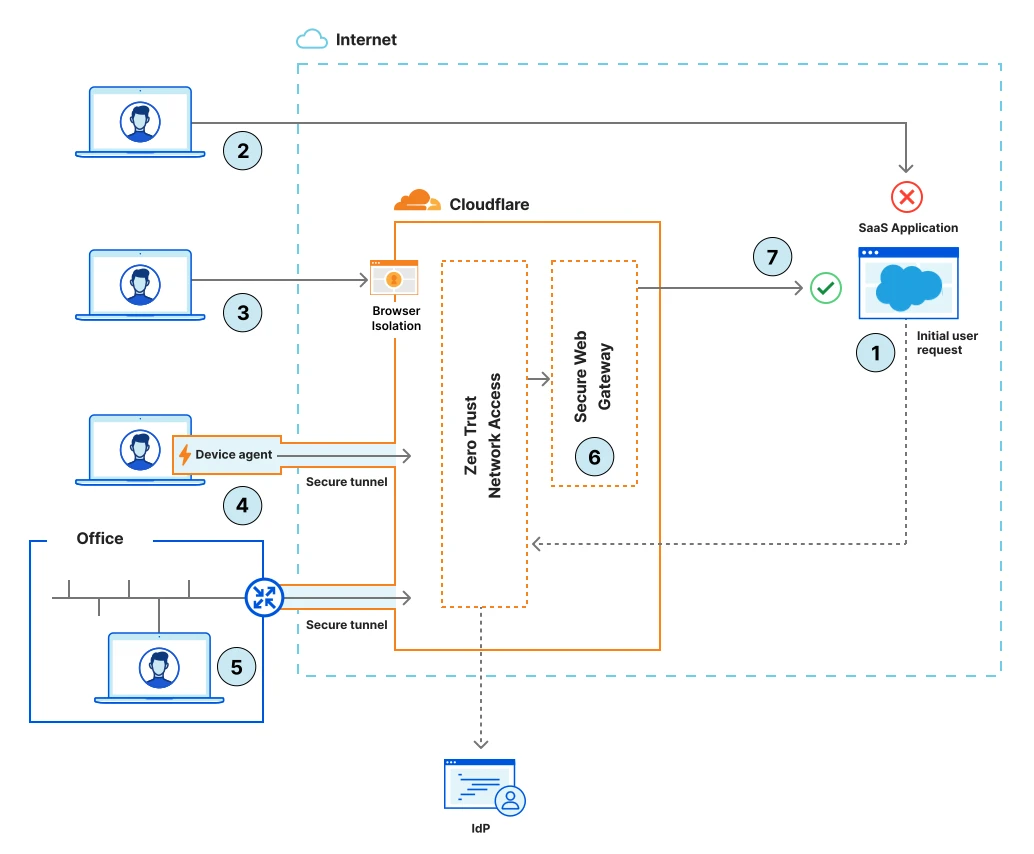
Truy cập SaaS an toàn với SASE Secure access to SaaS applications with SASE Secure access to SaaS applications with SASE
Zero Trust cho SaaS: policy theo identity, device posture và network context qua Cloudflare One. Cloudflare's SASE platform offers the ability to bring a more Zero Trust orientated approach to securing SaaS applications. Centralized policies, based on device posture, identity attributes and granular network location can be applied across one or many Saas applications. Cloudflare's SASE platform offers the ability to bring a more Zero Trust orientated approach to securing SaaS applications. Centralized policies, based on device posture, identity attributes and granular network location can be applied across one or many Saas applications.
Thuật ngữ: Concepts: Concepts: SASE · Gateway · Access · Device posture · SaaS
Sơ đồ chính thức ↗ Official diagram ↗ Official diagram ↗ · SASE / Cloudflare One Secure Access Service Edge (SASE) Secure Access Service Edge (SASE)
Câu hỏi thường gặp Frequently asked questions Frequently asked questions
Tunnel có thay Cloudflare Access không? Does Tunnel replace Cloudflare Access? Does Tunnel replace Cloudflare Access?
Không. Tunnel tạo đường nối outbound tới origin và có thể giấu IP. Access quyết định ai được vào app. App nội bộ nên có cả hai. No. Tunnel builds the outbound path to the origin and can hide the IP. Access decides who may enter the app. An internal app should have both. No. Tunnel builds the outbound path to the origin and can hide the IP. Access decides who may enter the app. An internal app should have both.
Tôi có phải mở port trên firewall không? Do I have to open a port on the firewall? Do I have to open a port on the firewall?
Không mở port inbound. `cloudflared` chủ động kết nối đi ra, thường qua cổng 7844. Firewall cần cho phép outbound đó, rồi có thể chặn inbound tới origin. Do not open an inbound port. `cloudflared` dials out, usually on port 7844. The firewall needs to allow that outbound path, and can then block inbound access to the origin. Do not open an inbound port. `cloudflared` dials out, usually on port 7844. The firewall needs to allow that outbound path, and can then block inbound access to the origin.
Origin có thấy IP thật của khách không? Does the origin see the visitor’s real IP? Does the origin see the visitor’s real IP?
Với HTTP, origin thấy IP của tiến trình cloudflared. IP khách nằm ở header CF-Connecting-IP. Với SSH, RDP hoặc TCP thuần, IP nguồn gốc không có tại origin. For HTTP, the origin sees the cloudflared process IP. The visitor IP is in the CF-Connecting-IP header. For SSH, RDP, or raw TCP, the original source IP is not available at the origin. For HTTP, the origin sees the cloudflared process IP. The visitor IP is in the CF-Connecting-IP header. For SSH, RDP, or raw TCP, the original source IP is not available at the origin.
Học tiếp trên hub (on-page backlinks) Keep learning on this hub (on-page links) Keep learning on this hub (on-page links)
- Tunnel (trang sản phẩm) Tunnel (product page) Tunnel (product page)
- Access là gì? What is Access? What is Access?
- Lộ trình Cloudflare One Cloudflare One track Cloudflare One track
- Use case: thay thế VPN Use case: replace VPN Use case: replace VPN
- Bài Access: vào app không cần VPN cũ Access post: reach apps without the old VPN Access post: reach apps without the old VPN
Nguồn tham khảo (blog.cloudflare.com) Sources (blog.cloudflare.com) Sources (blog.cloudflare.com)
Nội dung được viết lại để dễ hiểu hơn; luôn đọc bài gốc trên blog.cloudflare.com và docs chính thức khi cần chi tiết kỹ thuật hoặc cập nhật mới nhất. Content is rewritten for clarity; always read the original posts on blog.cloudflare.com and official docs for technical detail or the latest updates. Content is rewritten for clarity; always read the original posts on blog.cloudflare.com and official docs for technical detail or the latest updates.