
Turnstile là gì? Thay CAPTCHA khó chịu mà vẫn chặn bot trên form What is Turnstile? Replacing annoying CAPTCHAs while still stopping form bots What is Turnstile? Replacing annoying CAPTCHAs while still stopping form bots
Turnstile kiểm tra trình duyệt trước khi form được nhận — thường không bắt khách giải câu đố hình. Nhưng widget trên trang chưa đủ: server phải xác minh token. Turnstile checks the browser before a form is accepted — usually without making the visitor solve a picture puzzle. The widget on the page is not enough: the server must validate the token. Turnstile checks the browser before a form is accepted — usually without making the visitor solve a picture puzzle. The widget on the page is not enough: the server must validate the token.
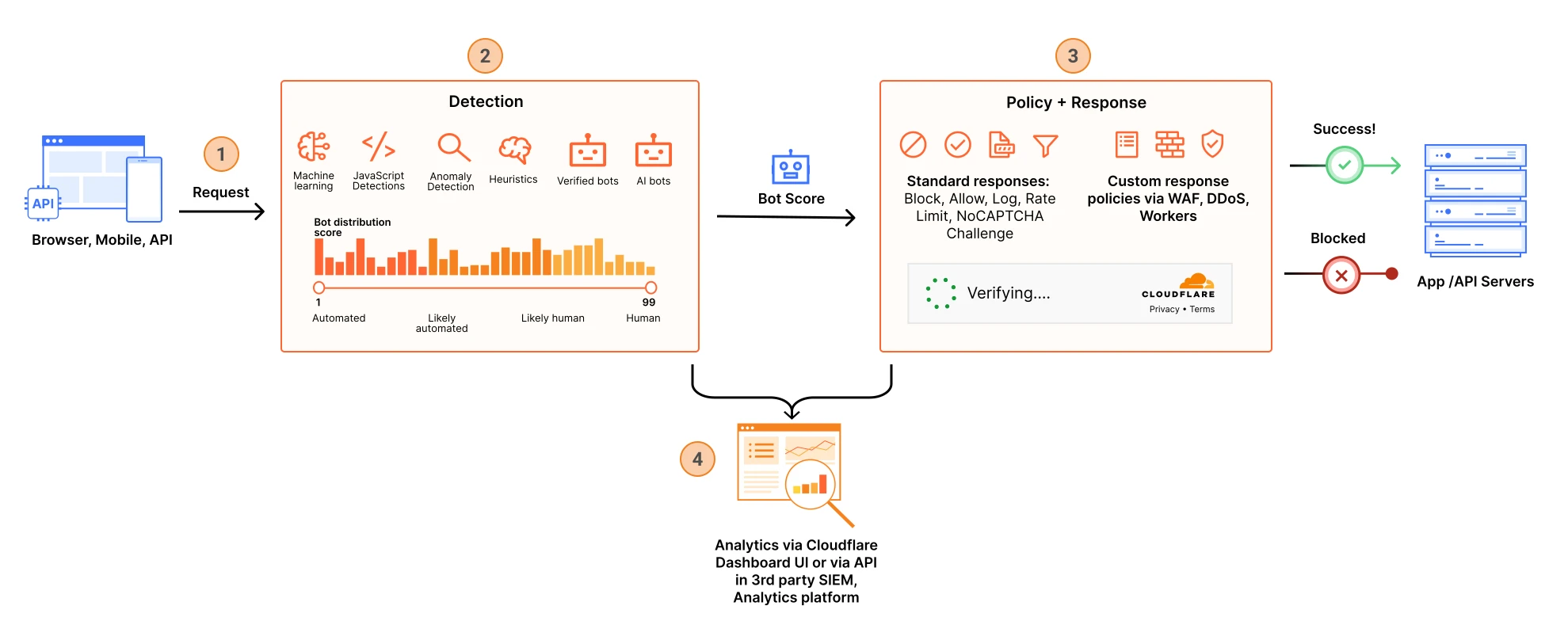
Quản lý bot Bot management Bot management
Luồng phát hiện, chấm điểm và xử lý bot traffic trên edge — nền tảng cho WAF, rate limit và Bot Management. Cloudflare has bot management capabilities to help identify and mitigate automated traffic to protect domains from bad bots. Cloudflare has bot management capabilities to help identify and mitigate automated traffic to protect domains from bad bots.
Thuật ngữ: Concepts: Concepts: Bot score · Super Bot Fight Mode · WAF · Rate limiting
Sơ đồ chính thức ↗ Official diagram ↗ Official diagram ↗ · Bot Bots Bots
Form mở là cửa mà bot gõ trước khách thật An open form is a door bots knock on before real visitors An open form is a door bots knock on before real visitors
Form đăng ký workshop, form liên hệ, form đặt lại mật khẩu đều có cùng vấn đề: ai cũng gọi được endpoint nếu biết URL. Bot gửi hàng nghìn lần, làm đầy database, đốt quota email, hoặc dò mật khẩu. CAPTCHA cổ điển chặn được một phần, nhưng bắt người thật chọn đèn giao thông thì tỷ lệ hoàn thành form giảm — đặc biệt trên điện thoại. Workshop signups, contact forms, and password resets share one problem: anyone can call the endpoint if they know the URL. Bots submit thousands of times, fill the database, burn email quota, or guess passwords. Classic CAPTCHAs stop some of that, but making real people pick traffic lights lowers completion — especially on a phone. Workshop signups, contact forms, and password resets share one problem: anyone can call the endpoint if they know the URL. Bots submit thousands of times, fill the database, burn email quota, or guess passwords. Classic CAPTCHAs stop some of that, but making real people pick traffic lights lowers completion — especially on a phone.
Turnstile là thử thách của Cloudflare chạy trong trình duyệt để phân biệt khách và automation. Nó bắt đầu bằng các bài kiểm tra không tương tác: proof-of-work, dò API của trình duyệt, tín hiệu hành vi. Chỉ khi rủi ro cao, widget mới hỏi người dùng tương tác. Tài liệu ghi rõ Turnstile không đọc nội dung form, không lưu tin nhắn của user — nó chỉ xử lý dữ liệu cần cho chức năng bảo mật này. Turnstile is Cloudflare’s browser challenge for telling visitors from automation. It starts with non-interactive checks: proof-of-work, probing browser APIs, behavior signals. Only when risk is high does the widget ask the person to interact. The docs are explicit that Turnstile does not read form contents or store the user’s messages — it processes only what this security check needs. Turnstile is Cloudflare’s browser challenge for telling visitors from automation. It starts with non-interactive checks: proof-of-work, probing browser APIs, behavior signals. Only when risk is high does the widget ask the person to interact. The docs are explicit that Turnstile does not read form contents or store the user’s messages — it processes only what this security check needs.
Widget đạt WCAG 2.2 AA, nên đây là lựa chọn dễ chịu hơn CAPTCHA hình ảnh cho site song ngữ. Trên blog.cloudflare.com, Turnstile thường đứng cạnh Bot Management và WAF: nó bảo vệ từng form, không thay lớp chặn request xấu cho cả zone. Hub này dùng Turnstile trên form đăng ký workshop; khi không có secret key ở local, form gửi token `dev-bypass` để dev vẫn thử được. The widget is WCAG 2.2 AA, so it is a kinder choice than image CAPTCHAs for a bilingual site. On blog.cloudflare.com, Turnstile usually sits next to Bot Management and WAF: it protects a specific form, and does not replace zone-wide blocking of bad requests. This hub uses Turnstile on the workshop signup form; with no local secret key, the form sends a `dev-bypass` token so development can still be tested. The widget is WCAG 2.2 AA, so it is a kinder choice than image CAPTCHAs for a bilingual site. On blog.cloudflare.com, Turnstile usually sits next to Bot Management and WAF: it protects a specific form, and does not replace zone-wide blocking of bad requests. This hub uses Turnstile on the workshop signup form; with no local secret key, the form sends a `dev-bypass` token so development can still be tested.
Quản lý bot Bot management Bot management
Luồng phát hiện, chấm điểm và xử lý bot traffic trên edge — nền tảng cho WAF, rate limit và Bot Management. Cloudflare has bot management capabilities to help identify and mitigate automated traffic to protect domains from bad bots. Cloudflare has bot management capabilities to help identify and mitigate automated traffic to protect domains from bad bots.
Thuật ngữ: Concepts: Concepts: Bot score · Super Bot Fight Mode · WAF · Rate limiting
Sơ đồ chính thức ↗ Official diagram ↗ Official diagram ↗ · Bot Bots Bots
Ba kiểu widget — và vì sao Managed là mặc định hợp lý Three widget types — and why Managed is the sensible default Three widget types — and why Managed is the sensible default
Managed (nên dùng) tự quyết định có hiện checkbox hay không theo mức rủi ro của khách. Non-Interactive hiện widget nhưng khách không cần bấm. Invisible chạy nền, không hiện gì. Invisible có điều kiện: bạn phải dẫn Privacy Addendum của Turnstile trong chính sách riêng tư của site. Cả ba kiểu dùng cùng logic thử thách; khác nhau ở chỗ khách có nhìn thấy widget không. Managed (the recommended default) decides whether to show a checkbox based on visitor risk. Non-Interactive shows the widget but the visitor does not have to click. Invisible runs in the background with nothing on screen. Invisible has a condition: you must reference Cloudflare’s Turnstile Privacy Addendum in your own privacy policy. All three use the same challenge logic; they differ in whether the visitor sees a widget. Managed (the recommended default) decides whether to show a checkbox based on visitor risk. Non-Interactive shows the widget but the visitor does not have to click. Invisible runs in the background with nothing on screen. Invisible has a condition: you must reference Cloudflare’s Turnstile Privacy Addendum in your own privacy policy. All three use the same challenge logic; they differ in whether the visitor sees a widget.
Khi tạo widget trong dashboard Turnstile bạn nhận sitekey và secret. Sitekey đặt lên HTML, ví dụ `<div class="cf-turnstile" data-sitekey="...">`. Secret chỉ được ở server — Worker secret, biến môi trường Pages, không commit vào git. Hostname của widget phải khớp domain thật; `localhost` tiện lúc dev nhưng không được nằm trong cấu hình production. Creating a widget in the Turnstile dashboard gives you a sitekey and a secret. The sitekey goes in HTML, for example `<div class="cf-turnstile" data-sitekey="...">`. The secret stays on the server — a Worker secret or Pages environment variable, never committed to git. The widget hostnames must match the real domain; `localhost` is fine while developing and must not remain in the production configuration. Creating a widget in the Turnstile dashboard gives you a sitekey and a secret. The sitekey goes in HTML, for example `<div class="cf-turnstile" data-sitekey="...">`. The secret stays on the server — a Worker secret or Pages environment variable, never committed to git. The widget hostnames must match the real domain; `localhost` is fine while developing and must not remain in the production configuration.
Từ tháng 8 năm 2026, Turnstile Spin (đã GA) giúp tạo widget và nối Siteverify từ dashboard, Wrangler, hoặc agent trong editor. Spin không đổi mô hình bảo mật: vẫn là sitekey công khai và secret phía server. Nếu widget đã có nhưng chưa có traffic Siteverify, dashboard có thể hiện lối “Fix with Spin” — dấu hiệu phần xác minh server còn thiếu. Since August 2026, Turnstile Spin (generally available) can create the widget and wire Siteverify from the dashboard, Wrangler, or an agent in your editor. Spin does not change the security model: a public sitekey and a server-side secret. If a widget exists but has no Siteverify traffic, the dashboard can show “Fix with Spin” — a sign the server check is still missing. Since August 2026, Turnstile Spin (generally available) can create the widget and wire Siteverify from the dashboard, Wrangler, or an agent in your editor. Spin does not change the security model: a public sitekey and a server-side secret. If a widget exists but has no Siteverify traffic, the dashboard can show “Fix with Spin” — a sign the server check is still missing.
Siteverify là phần bắt buộc, không phải bước tùy chọn Siteverify is mandatory, not an optional extra Siteverify is mandatory, not an optional extra
Widget trên trình duyệt tạo một token. Token đó có thể giả, hết hạn, hoặc đã dùng. Nếu server tin body client và insert database ngay, bot bỏ qua giao diện và POST thẳng. Bạn phải gọi `https://challenges.cloudflare.com/turnstile/v0/siteverify` từ server, gửi secret và token (field `response`). Chỉ khi `success` là true mới xử lý form. The browser widget produces a token. That token can be forged, expired, or already used. If the server trusts the client body and inserts into the database immediately, a bot skips the UI and POSTs directly. You must call `https://challenges.cloudflare.com/turnstile/v0/siteverify` from the server with the secret and the token (the `response` field). Process the form only when `success` is true. The browser widget produces a token. That token can be forged, expired, or already used. If the server trusts the client body and inserts into the database immediately, a bot skips the UI and POSTs directly. You must call `https://challenges.cloudflare.com/turnstile/v0/siteverify` from the server with the secret and the token (the `response` field). Process the form only when `success` is true.
Token hết hạn sau 300 giây và chỉ validate được một lần. Form nhiều bước hoặc SPA giữ nguyên trang sau khi submit phải gọi `turnstile.reset(widgetId)` trước lần thử lại. Nên kiểm tra thêm `hostname` (và `action` nếu bạn đặt) trong kết quả Siteverify, để token sinh ở site khác không dùng lại được. Không gọi Siteverify thì analytics Turnstile hiện số validation bằng không — đó là cấu hình chưa xong, không phải “ít bot”. Tokens expire after 300 seconds and can be validated only once. A multi-step form or an SPA that stays on the page after submit must call `turnstile.reset(widgetId)` before a retry. Also check `hostname` (and `action` if you set one) in the Siteverify result so a token minted on another site cannot be reused. Skip Siteverify and Turnstile Analytics shows zero validations — that is an unfinished setup, not “few bots”. Tokens expire after 300 seconds and can be validated only once. A multi-step form or an SPA that stays on the page after submit must call `turnstile.reset(widgetId)` before a retry. Also check `hostname` (and `action` if you set one) in the Siteverify result so a token minted on another site cannot be reused. Skip Siteverify and Turnstile Analytics shows zero validations — that is an unfinished setup, not “few bots”.
Pre-clearance có thể thêm cookie `cf_clearance`, nhưng token Turnstile vẫn phải qua Siteverify. Đừng log secret, đừng đưa secret vào query string, và đừng để frontend tự gọi Siteverify — kẻ tấn công sẽ thấy secret trong request của trình duyệt. Pre-clearance can add a `cf_clearance` cookie, but the Turnstile token still has to pass Siteverify. Do not log the secret, do not put it in a query string, and do not let the frontend call Siteverify itself — an attacker would see the secret in the browser request. Pre-clearance can add a `cf_clearance` cookie, but the Turnstile token still has to pass Siteverify. Do not log the secret, do not put it in a query string, and do not let the frontend call Siteverify itself — an attacker would see the secret in the browser request.
Turnstile đứng cùng rate limiting và WAF, không đứng một mình Turnstile stands with rate limiting and WAF, not alone Turnstile stands with rate limiting and WAF, not alone
Turnstile trả lời “request này có vẻ là người không?”. Rate limiting trả lời “IP hoặc đường dẫn này đã gọi quá nhiều lần chưa?”. WAF trả lời “payload có giống SQLi hay XSS không?”. Ba câu khác nhau. Form login nên có cả ba: Turnstile trên form, rate limit trên `/api/login`, managed ruleset trên zone. Bài bot và bài rate limiting trên hub này đi tiếp từ đây. Turnstile answers “does this request look like a person?”. Rate limiting answers “has this IP or path called too often?”. WAF answers “does the payload look like SQLi or XSS?”. Three different questions. A login form should have all three: Turnstile on the form, a rate limit on `/api/login`, and a managed ruleset on the zone. The bot and rate-limiting posts on this hub continue from here. Turnstile answers “does this request look like a person?”. Rate limiting answers “has this IP or path called too often?”. WAF answers “does the payload look like SQLi or XSS?”. Three different questions. A login form should have all three: Turnstile on the form, a rate limit on `/api/login`, and a managed ruleset on the zone. The bot and rate-limiting posts on this hub continue from here.
Checklist tuần đầu: tạo widget Managed cho đúng hostname; nhúng script sớm để token kịp lúc khách bấm gửi; lưu secret bằng `wrangler secret put`, không ghi trong `wrangler.toml`; từ chối request khi Siteverify lỗi mạng thay vì “cho qua cho tiện”; thử submit thật rồi gửi lại đúng token cũ để chắc lần hai bị từ chối. First-week checklist: create a Managed widget for the right hostnames; load the script early so the token is ready when the visitor submits; store the secret with `wrangler secret put`, not in `wrangler.toml`; reject the request when Siteverify has a network error instead of failing open; submit once for real, then replay the same token and confirm the second call is rejected. First-week checklist: create a Managed widget for the right hostnames; load the script early so the token is ready when the visitor submits; store the secret with `wrangler secret put`, not in `wrangler.toml`; reject the request when Siteverify has a network error instead of failing open; submit once for real, then replay the same token and confirm the second call is rejected.
Câu hỏi tự kiểm tra: “Nếu tôi xóa widget trên HTML nhưng vẫn POST JSON, server có từ chối không?” Nếu không, Turnstile mới chỉ là đồ trang trí. Đọc trang sản phẩm Turnstile, use case bảo vệ website, và docs widget khi bạn cần theme, kích thước compact, hoặc chế độ `execution: execute` cho form nhiều bước. Self-check: “If I delete the widget from the HTML and still POST JSON, does the server reject it?” If not, Turnstile is decoration. Read the Turnstile product page, the protect-website use case, and the widget docs when you need a theme, the compact size, or `execution: execute` for a multi-step form. Self-check: “If I delete the widget from the HTML and still POST JSON, does the server reject it?” If not, Turnstile is decoration. Read the Turnstile product page, the protect-website use case, and the widget docs when you need a theme, the compact size, or `execution: execute` for a multi-step form.
Câu hỏi thường gặp Frequently asked questions Frequently asked questions
Chỉ nhúng widget là form đã an toàn chưa? Is the form safe once the widget is embedded? Is the form safe once the widget is embedded?
Chưa. Widget tạo token trên trình duyệt. Server phải gọi Siteverify với secret trước khi ghi dữ liệu. Không có bước đó, bot gọi thẳng API. Not yet. The widget creates a token in the browser. The server must call Siteverify with the secret before writing data. Without that step, a bot calls the API directly. Not yet. The widget creates a token in the browser. The server must call Siteverify with the secret before writing data. Without that step, a bot calls the API directly.
Nên chọn Invisible hay Managed? Should I choose Invisible or Managed? Should I choose Invisible or Managed?
Managed là mặc định nên dùng: chỉ hỏi tương tác khi rủi ro cao. Invisible giấu hoàn toàn widget, nhưng bạn phải dẫn Turnstile Privacy Addendum trong chính sách riêng tư. Managed is the recommended default: it asks for interaction only when risk is high. Invisible hides the widget completely, but you must reference the Turnstile Privacy Addendum in your privacy policy. Managed is the recommended default: it asks for interaction only when risk is high. Invisible hides the widget completely, but you must reference the Turnstile Privacy Addendum in your privacy policy.
Token dùng được bao lâu? How long is a token valid? How long is a token valid?
Khoảng 300 giây, và mỗi token chỉ validate một lần. Form ở lại trên trang sau khi gửi phải reset widget trước lần thử tiếp theo. About 300 seconds, and each token can be validated only once. A form that stays on the page after submit must reset the widget before the next try. About 300 seconds, and each token can be validated only once. A form that stays on the page after submit must reset the widget before the next try.
Học tiếp trên hub (on-page backlinks) Keep learning on this hub (on-page links) Keep learning on this hub (on-page links)
- Turnstile (trang sản phẩm) Turnstile (product page) Turnstile (product page)
- WAF là gì? What is WAF? What is WAF?
- Lộ trình Application Services Application Services track Application Services track
- Use case: bảo vệ website Use case: protect a website Use case: protect a website
- Kết hợp rate limiting Combine with rate limiting Combine with rate limiting
Nguồn tham khảo (blog.cloudflare.com) Sources (blog.cloudflare.com) Sources (blog.cloudflare.com)
Nội dung được viết lại để dễ hiểu hơn; luôn đọc bài gốc trên blog.cloudflare.com và docs chính thức khi cần chi tiết kỹ thuật hoặc cập nhật mới nhất. Content is rewritten for clarity; always read the original posts on blog.cloudflare.com and official docs for technical detail or the latest updates. Content is rewritten for clarity; always read the original posts on blog.cloudflare.com and official docs for technical detail or the latest updates.