Lộ trình đang học Current learning path

Cloudflare One Cloudflare One

Bảo vệ users, access, SaaS và networks. Secure users, access, SaaS, and networks.

Về trang lộ trình Track home

Phần 3: Secure browsing (SWG) Part 3: Secure browsing (SWG) · Bài 2/2 Lesson 2/2

CASB và DLP (khi sẵn sàng) CASB and DLP (when ready)

Sau khi ZTNA ổn định, thêm kiểm soát upload/download SaaS và dữ liệu nhạy cảm. After ZTNA is stable, add controls for SaaS uploads/downloads and sensitive data.

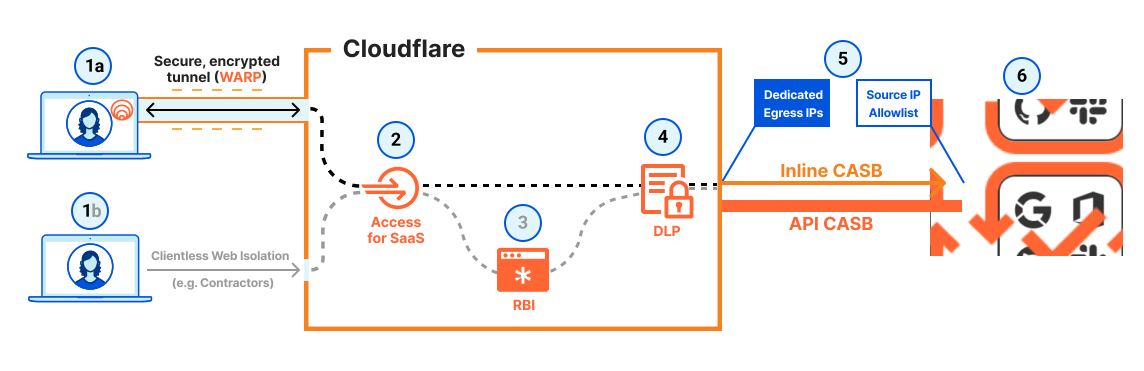
CASB and DLP (when ready)
Minh họa từ Cloudflare Reference Architecture (developers.cloudflare.com) Illustration from Cloudflare Reference Architecture (developers.cloudflare.com)

Các bước thực hiện Step-by-step

  1. Sau ZTNA ổn định: bật CASB scan SaaS (Shadow IT). After stable ZTNA: enable CASB SaaS scanning (Shadow IT).
  2. Gateway HTTP policies: block upload PII ra SaaS không approved. Gateway HTTP policies: block PII uploads to unapproved SaaS.
  3. DLP profiles: credit card, national ID patterns. DLP profiles: credit card, national ID patterns.
  4. Pilot DLP với log-only trước block. Pilot DLP in log-only before block.

Giải thích chi tiết Detailed explanation

CASB + DLP là lớp tiếp theo — đừng bật cùng lúc với ZTNA pilot để tránh overwhelm support. CASB + DLP are the next layer — don’t enable alongside ZTNA pilot to avoid overwhelming support.

Lưu ý (best practices) Note (best practices)

HTTP inspection (CASB/DLP) cần cài root cert và bật TLS decryption; tạo Do Not Inspect cho app dùng certificate pinning. Cấu hình DLP profile sau khi HTTPS inspection sẵn sàng. HTTP inspection (CASB/DLP) requires installing the root certificate and enabling TLS decryption; create Do Not Inspect policies for certificate-pinning apps. Configure DLP profiles after HTTPS inspection is ready.

Nguồn: Source: Gateway traffic policies — Get started Gateway traffic policies — Get started

Ví dụ triển khai (Cloudflare Resources) Deployment examples (Cloudflare Resources)

Ví dụ chính thức từ Cloudflare Resources — gợi ý theo chủ đề bài học trong lộ trình này. Official examples from Cloudflare Resources — matched to this lesson within this path.

Tutorial Tutorial Cloudflare One Cloudflare One

Truy cập clientless tới DNS private qua Cloudflare Access Access a web application via its private hostname without the Cloudflare One Client

Tóm tắt thực hành: Access web ứng dụng via its private hostname without Cloudflare One Client trên Cloudflare One (Zero Trust). With Cloudflare Browser Isolation and resolver policies, users can connect to private web-based applications via their private hostnames.

With Cloudflare Browser Isolation and resolver policies, users can connect to private web-based applications via their private hostnames.

Tìm hiểu thêm Learn more
Tutorial Tutorial Cloudflare One Cloudflare One

Access và secure MySQL cơ sở dữ liệu using Cloudflare Tunnel và network policies Access and secure a MySQL database using Cloudflare Tunnel and network policies

Tóm tắt thực hành: Access và secure MySQL cơ sở dữ liệu using Cloudflare Tunnel và network policies trên Cloudflare One (Zero Trust). Using Cloudflare Tunnel's private networks, users can connect to arbitrary non-browser based TCP/UDP applications, like databases. You can set up network policies that implement z…

Using Cloudflare Tunnel's private networks, users can connect to arbitrary non-browser based TCP/UDP applications, like databases. You can set up network policies that implement zero trust controls to define who and what can access those applications using the Cloudflare One Client.

Tìm hiểu thêm Learn more
Tutorial Tutorial Cloudflare One Cloudflare One

Xây dựng API to access D1 using proxy Worker Build an API to access D1 using a proxy Worker

This tutorial shows how to create an API that allows you to securely run queries against a cơ sở dữ liệu D1. The API can be used to customize access controls and/or limit what tables can be queried.

This tutorial shows how to create an API that allows you to securely run queries against a D1 database. The API can be used to customize access controls and/or limit what tables can be queried.

Tìm hiểu thêm Learn more
Tutorial Tutorial Cloudflare One Cloudflare One

Kết nối through Cloudflare Access using CLI Connect through Cloudflare Access using a CLI

Tóm tắt thực hành: Kết nối through Cloudflare Access using CLI trên Cloudflare One (Zero Trust). Cloudflare's cloudflared command-line tool allows you to interact with endpoints protected by Cloudflare Access.

Cloudflare's cloudflared command-line tool allows you to interact with endpoints protected by Cloudflare Access.

Tìm hiểu thêm Learn more

Xem thêm ví dụ trong lộ trình → More examples in this path →

Tài liệu Cloudflare Developers Cloudflare Developer docs

Sơ đồ kiến trúc (Cloudflare Docs) Architecture diagrams (Cloudflare Docs)

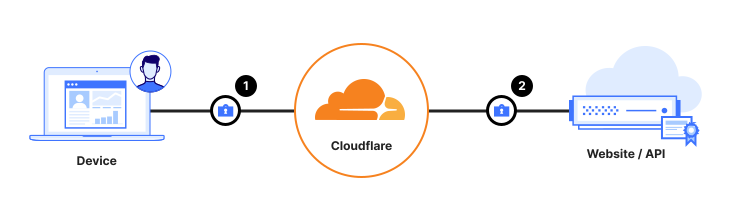
Figure 1: Securing data from the user device, all the way to the website/API

Securing data in transit Securing data in transit

Bảo vệ data in transit với Gateway/DLP — inspect TLS traffic trước khi tới SaaS hoặc Internet. Data in transit is often considered vulnerable to interception or tampering during transmission. Data Loss Prevention (DLP) technologies can be used to inspect the contents of network traffic and block sensitive data from going to a risky destination.

Thuật ngữ: Concepts: Gateway · DLP · TLS · CASB · Inline inspection

Sơ đồ chính thức ↗ Official diagram ↗ · Security Security

Figure 1: Overall solution of user access controls to, and the discovery of, sensitive data.

Securing data at rest Securing data at rest

Learn how Cloudflare's API-driven Cloud Access Security Broker (CASB) works and secures data at rest. Learn how Cloudflare's API-driven Cloud Access Security Broker (CASB) works and secures data at rest.

Thuật ngữ: Concepts: CASB · SaaS API · Data at rest · DLP

Sơ đồ chính thức ↗ Official diagram ↗ · Security Security

Sản phẩm liên quan Related products

Học xong hoặc muốn đổi hướng? Finished or want a different path?

Ba lộ trình độc lập — mỗi lộ trình chỉ gồm bài học và tài liệu trong phạm vi đó. Chọn lộ trình khác khi sẵn sàng, không cần học song song. Three independent paths — each includes only lessons and materials for that scope. Switch when you are ready; no need to study paths in parallel.

Chưa chắc — làm bài chọn lộ trình Not sure — use the path selector · So sánh cả ba lộ trình Compare all three paths